How to Get the Most Out of the MilSim Units Directory: Pro Search Tips
Stop wasting time scrolling through dead or mismatched units. This guide reveals pro search tips and hidden filters on the MilSim Units Directory so you can quickly find the perfect realism unit that matches your game, schedule, experience level, and playstyle.
May 4, 2026
How to Get the Most Out of the MilSim Units Directory: Pro Search Tips
Stop guessing - use the powerful filters to find your perfect milsim unit in minutes.
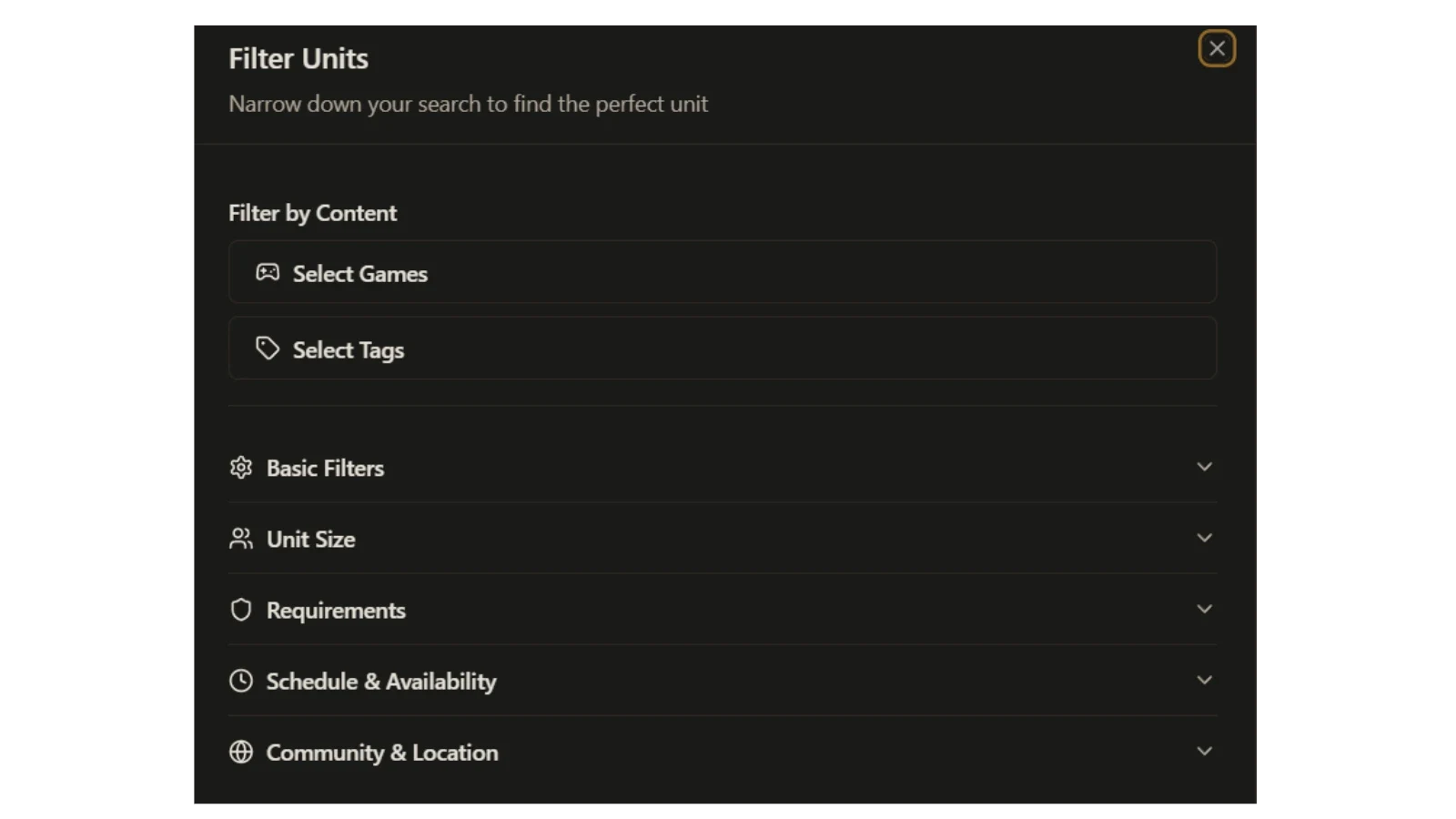
The MilSim Units Directory gives you advanced tools to narrow down hundreds of units. Most players only use basic search and end up joining the wrong units, wasting weeks of trial-and-error.
This guide walks you through every major filter and explains exactly why it’s worth using so you can zero in on units that actually match your playstyle, schedule, and goals.
Pro Search Strategy: Why Each Filter Matters
1. Start with “Filter by Content”
-
Select Games - Choose your main game(s): Arma Reforger, Arma 3, Squad, Bellum, 'TAvr, WARDOGS, Hell Let Loose: Vietnam, etc.
Why it’s powerful: This is the fastest way to remove 70-80% of irrelevant units. If you only play Reforger, there’s no point in seeing Squad or new titles. -
Select Tags - Add specific tags like “Zeus Training”, “Cold War”, “Persistent Warfare”, “English Only”, “Special Forces”, etc.
Why it’s powerful: Tags reveal a unit’s unique flavor and focus. It instantly surfaces units that do exactly what you’re looking for instead of generic ones.
2. Use Basic Filters (Most Important for Quick Results)
-
Platforms - PC, PlayStation, or Xbox
Why it’s powerful: Saves you from clicking into units you literally can’t join. -
Status - Currently Recruiting + Verified Units Only
Why it’s powerful: “Currently Recruiting” shows units that are actually open right now. “Verified” means the directory has confirmed they’re active and legitimate - huge time-saver. -
Unit Size - Small (1–30), Medium (31–90), Large (91–250), Extra Large (251+)
Why it’s powerful: Size affects your experience dramatically. Small units feel like a tight-knit squad; large ones offer big ops but can feel more anonymous. Pick what actually fits your preference.
3. Requirements Filter
- Set Maximum Age Requirement, Microphone, Training, and Attendance Policy
Why it’s powerful: These are the biggest deal-breakers. Filtering them upfront prevents you from falling in love with a unit only to discover you don’t meet their age, mic, or mandatory training rules.
4. Schedule & Availability (The #1 Retention Filter)
- Days of Operation - Specific days or Weekdays / Weekends
- Operation Times - Morning, Afternoon, Evening, Night
- My Availability - Set your personal hours
- Timezone Filter - Show only units in your timezone
Why this section is gold: Schedule mismatch is the #1 reason players quit units. By filtering here first, you only see units you can actually attend long-term. This single section prevents more frustration than any other filter.
5. Community & Location
-
Playstyle - Realism (Milsim), Semi-Realism (TacSim), Relaxed (Chillsim), Just For Fun, Run & Gun, Strategic, Weekend Warriors, etc.
Why it’s powerful: Playstyle is what defines the unit’s culture. A hardcore milsim player will be miserable in a “Just For Fun” unit and vice versa. -
Region - Asia, Europe, North America, etc.
Why it’s powerful: Helps you find units with players in similar timezones and cultural fit, making voice chat and community feel more natural.
Pro Workflow Most Players Don’t Use (Do This Every Time)
- Select your Game first
- Open Schedule & Availability and set your days + operation times
- Set Playstyle to your preferred realism level
- Enable Currently Recruiting + Verified Units Only
- Adjust Unit Size to what you want
→ You’ll usually go from hundreds of units down to 5–20 perfect matches in under a minute.
How to Evaluate Units After Filtering
Once the list is small:
- Read the full unit description and recent activity
- Check their last operation date
- Join their Discord as a guest and observe the vibe for a day or two
- Look for clear training programs and mentorship
Bonus Pro Tips
- Use Daily Voting on units you like - it helps the best units rise in the rankings
- Bookmark your favorite filter combinations
- Re-run your search every 2–4 weeks - new units (especially for 2026 titles) appear constantly
- Combine Tags with Schedule for the most precise results
Find Your Unit Today
The right unit transforms milsim from “meh” to unforgettable. Don’t settle for “good enough.”
Open the MilSim Units Directory →
and start using these filters right now.
What’s the most important thing you look for in a unit?
Drop your answer in the comments - we read every one and it helps us improve the directory.
Written for the MilSim Units Blog - helping players find their forever unit.
Comments (0)
Sign in to join the discussion.
Be the first to comment.