How UnitShield protects your MilSim community
UnitShield is a cross-community player reporting network for MilSim units. When a player is reported in one community, every partnered unit sees that history. Track players across Discord and Steam accounts, catch alt accounts automatically, and get real-time alerts when flagged players join your server. All core features are free.
Oct 12, 2026
What are UnitShield
UnitShield is a cross-community player reporting network built for MilSim units. When your community files a report against a player, every partnered unit gets access to that report history. The next time that player tries to join another unit's Discord, UnitShield's bot posts an alert with context about that player's past behavior.
Reports are filed through a web dashboard and cover the kinds of issues MilSim communities actually deal with:
Toxic Behavior | Harassment | Cheating/Exploiting | Griefing | Ban Evasion | Impersonation | Security Concern | Mod Leaking | Poaching | Stolen Valor | Time Wasting | Trolling
Every report tracks the player across Discord IDs, Steam IDs, and usernames. If someone makes an alt account but keeps the same Steam ID, UnitShield's identifier graph links the reports together automatically.
The problem every unit deals with
If you run a MilSim unit, you know the cycle. A new member joins, seems great at first, then starts causing problems. Maybe they leak your private mods to a public Discord. Maybe they poach your members for a rival unit. Maybe they waste weeks of your training pipeline before ghosting. Maybe they claim ranks and experience they never earned.
You ban them, warn a few friends on Discord, and move on. But that person just joins the next unit and does the same thing. There is no shared record. No way for Unit 2 to know what happened in Unit 1.
That is the problem UnitShield solves.
What UnitShield is NOT
This is important to address up front. UnitShield is not a tool for harassment, and it is not designed to permanently blacklist people from the MilSim community. It is a guidance tool. When a reported player joins your server, UnitShield gives your leadership team the information they need to make an informed decision. What you do with that information is entirely up to you.
We believe everyone deserves a fair chance. A report on UnitShield does not mean someone is guilty. It means another community had a problem with that player and wanted to make other units aware. Maybe the situation was a misunderstanding. Maybe the player has genuinely changed since then. Maybe the report is exaggerated. That is exactly why UnitShield includes trust scoring, community voting, and an appeal system.
UnitShield should never be the only thing you rely on when deciding whether to accept a new member. Think of it as one part of your vetting process, not the whole thing. The alert you receive is a starting point for a conversation, not an automatic rejection.
Integrating UnitShield into your interview process
Many MilSim units already run some form of interview or intake process for new members. UnitShield fits directly into that workflow. When a new applicant has reports on their profile, your recruiters can bring it up during the interview in a respectful and fair way.
For example: "We use UnitShield as part of our vetting process, and we can see you have a report from another community regarding [category]. We are not here to judge you based on someone else's experience, but we would like to hear your side. Can you tell us what happened?"
This gives the applicant a chance to explain themselves and gives your team real context beyond a name on a list. Some players were reported unfairly. Some had a legitimate conflict that both sides share blame for. And some players will tell you exactly what you need to hear to make a confident decision either way.
The goal is not to punish people. The goal is to protect your community while still treating every person who walks through your door with fairness and respect.
Appeals
Every player who has been reported on UnitShield has the ability to appeal the report. Appeals are reviewed and give the reported player a chance to provide their side of the story, share context, or present evidence that contradicts the original report. This is a core part of the platform because we believe in accountability on both sides. The person filing the report and the person being reported should both have a voice.
How it works in practice
UnitShield works across two platforms: the Discord bot and the web panel. Both are fully functional and stay in sync. You can create reports, look up players, manage settings, and review alerts from either one. Some staff prefer doing everything from Discord without leaving the server. Others prefer the panel's broader view with charts, timelines, and detailed player profiles. Both are first-class experiences.
1. A reported player joins your Discord
The moment someone with reports joins your server, UnitShield's bot posts a detailed alert in your configured channel. The alert shows how many reports they have, which communities filed them, what categories the reports fall under, and recent report summaries. Your staff can view the full player profile on the panel, vote on the reports, or take action directly from Discord.
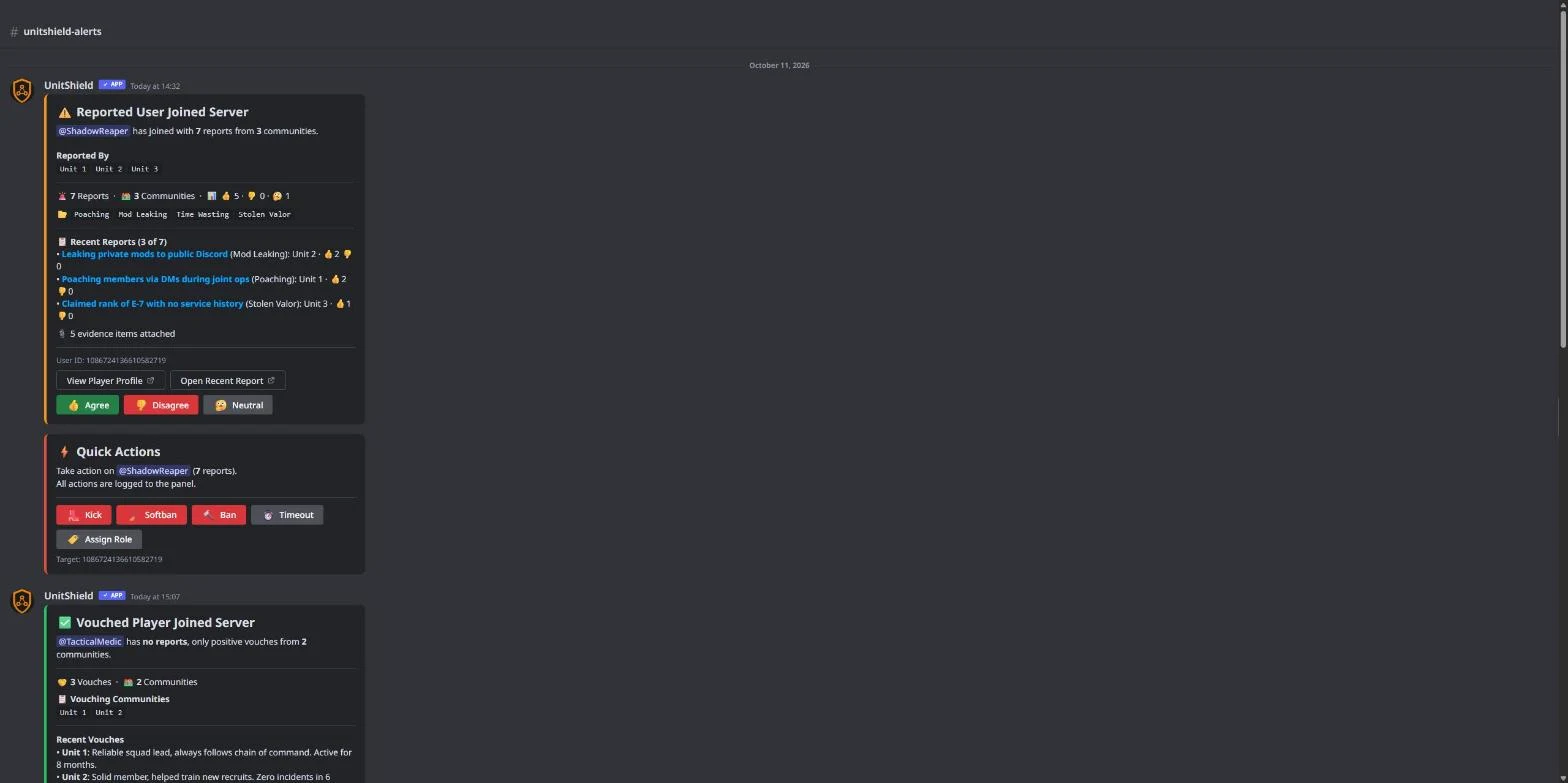
Discord bot messages: join alert with report details, quick-action buttons, vouched player notification, new report broadcast, auto-ban log, and manual player lookup.
If a clean player joins, or one with only positive vouches from other communities, you get a green "All Clear" or "Vouched Player" message instead. Quick-action buttons let your staff kick, ban, softban, timeout, or assign a flagged role directly from the alert.
Remember: an alert is information, not a verdict. Use it as context during your intake process.
2. Look up any player's history
Use /checkuser in Discord or the Player Lookup page on the dashboard to search any Discord ID, Steam ID, or username. UnitShield walks the full identifier graph, so if a player has multiple Discord accounts linked through a shared Steam ID, you see reports from all of them.
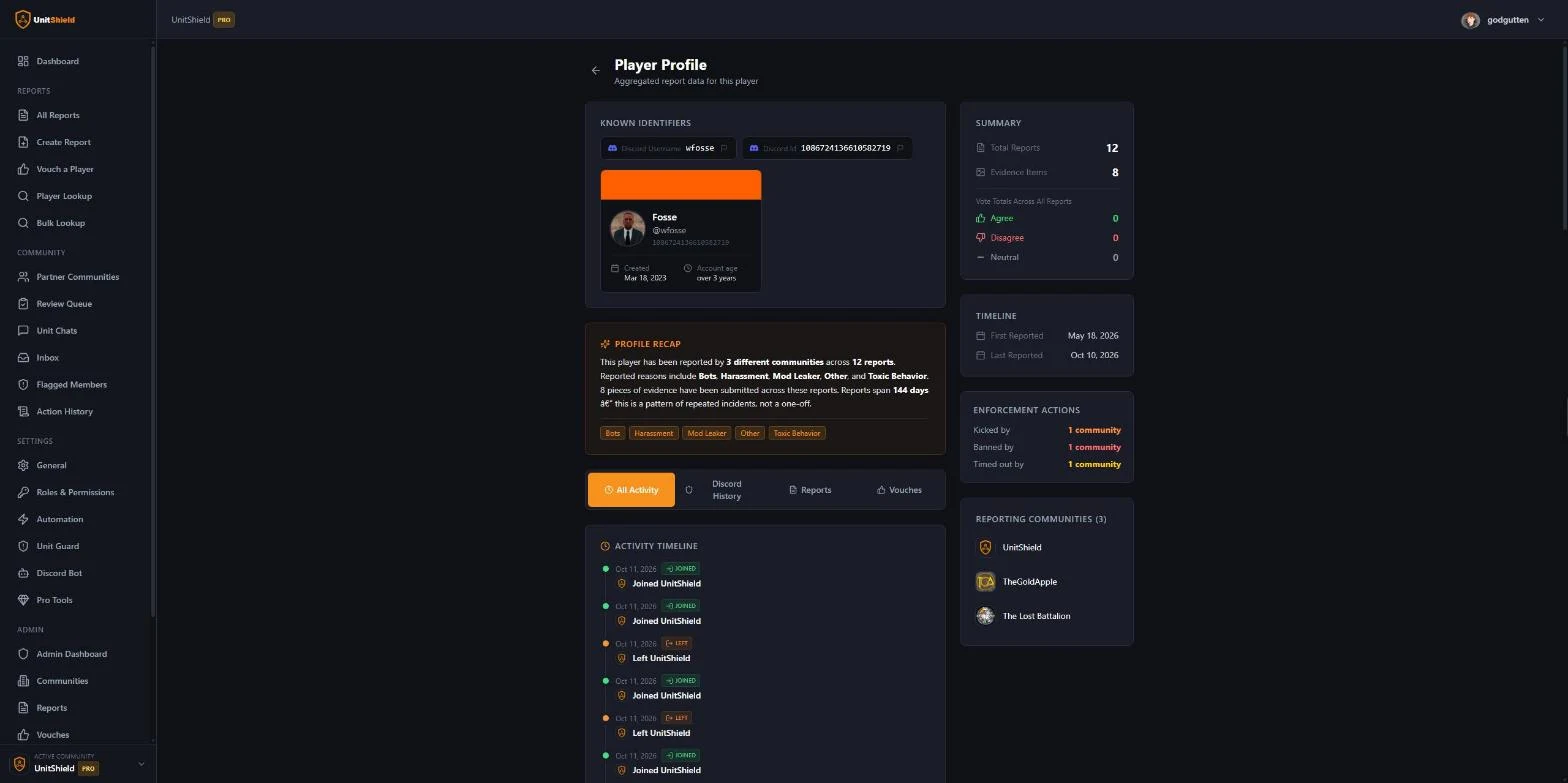
Player profile page: report summary, category tags, activity timeline, enforcement actions taken, and which communities filed reports.
The player profile page gives you the full picture: every report, every vouch, which communities were involved, what actions were taken, and how the broader community voted on each report. This is where you go when you want the complete story before making a decision.
3. Filing reports from Discord or the panel
Reports can be created from either the Discord bot or the web panel. Both methods produce the same result and the report is broadcast to all partnered communities the same way.
From Discord: Use the /report-player command to file a report without leaving your server. Fill in the player's identifiers, select a category, write a description, and submit. You can also right-click any message and select "Create UnitShield Report" to start a report directly from context. Quick and easy for staff who live in Discord.
From the panel: The web dashboard gives you a full form with more room to write detailed descriptions, attach multiple pieces of evidence, and review everything before publishing.
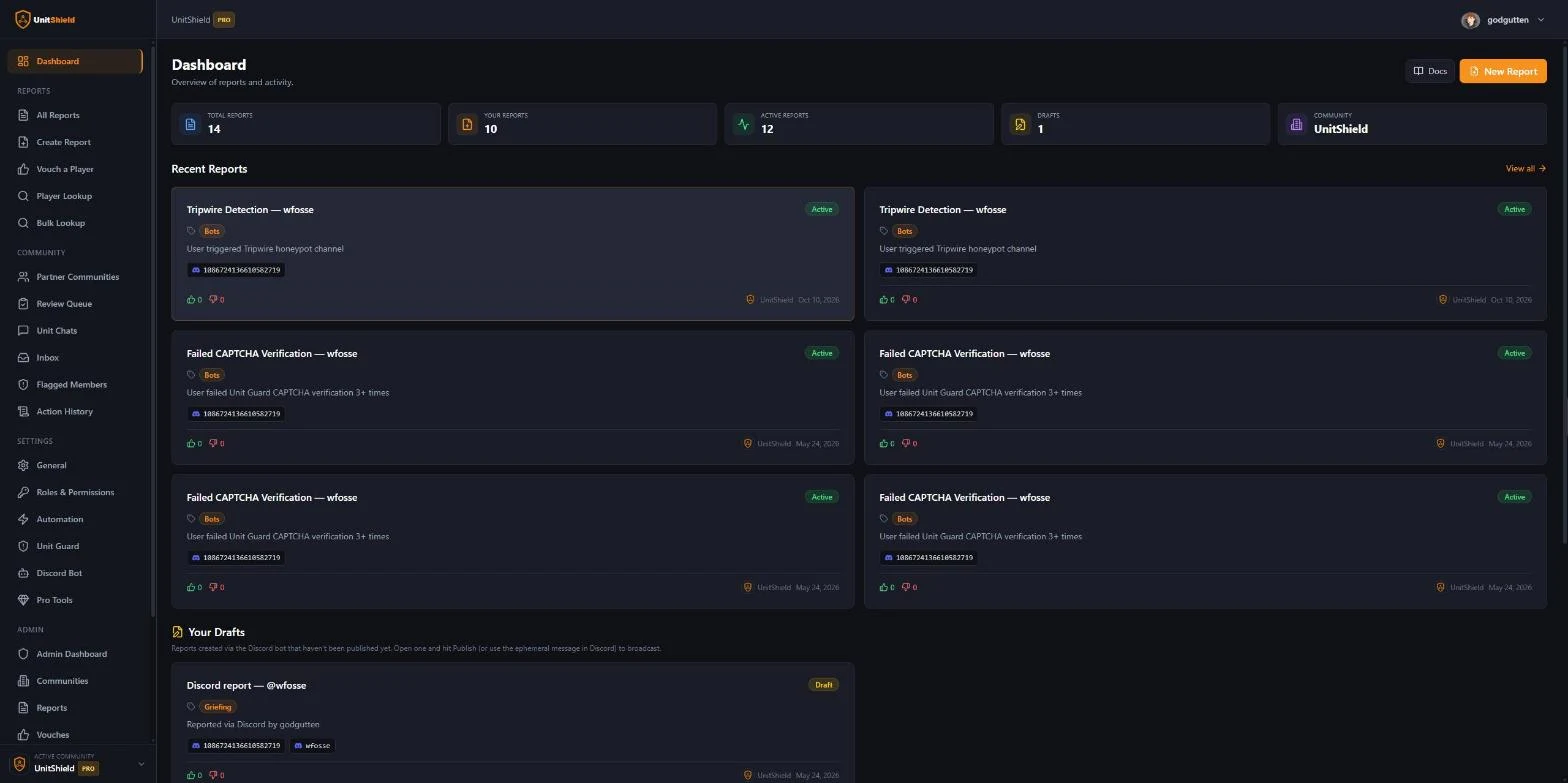
Dashboard overview: total reports, active reports, community stats, and recent activity at a glance.
Evidence matters. When you file a report, attaching evidence is critical. Screenshots, chat logs, links to incidents, timestamps, anything that supports your claim. Reports with strong evidence carry more weight in the community voting system and are taken more seriously by other units reviewing the report. A report that just says "this person is toxic" with no proof is far less useful than one with screenshots showing the exact behavior.
Think of it this way: if another unit is going to use your report to make decisions about a player, they need to be able to verify what happened. Evidence is what makes that possible.
4. Set up automation rules
For communities that want hands-off protection, UnitShield supports full automation. Configure thresholds (minimum report count, minimum reporting communities, minimum agree votes) and the bot will auto-kick, auto-ban, or auto-assign a role when a reported player joins.
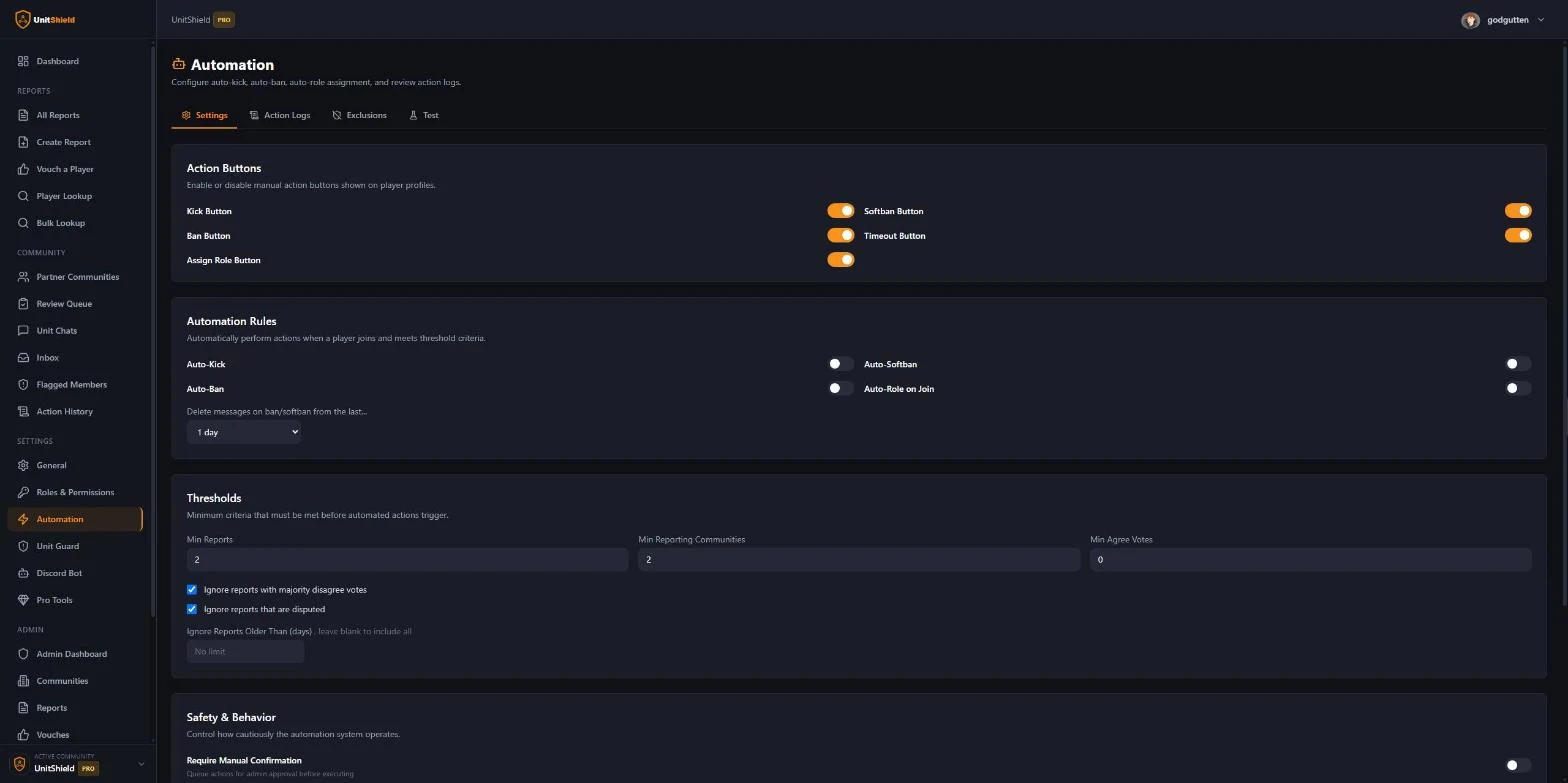
Automation settings: toggle action buttons, enable auto-kick or auto-ban, set thresholds, and control safety behaviors.
All automated actions require manual confirmation by default. You control the thresholds, and you can exclude specific players or report categories from triggering automation.
How trust scores and community voting work
UnitShield does not treat every report as automatically true. Instead, it uses a community-driven trust system that lets the network collectively decide how credible a report is.
How voting works
When a report is published, every partnered community can vote on it: Agree, Disagree, or Neutral. This is not a popularity contest. Each vote represents a community's assessment based on the evidence provided and their own experience with the reported player.
- Agree means your community has seen similar behavior or believes the evidence is credible.
- Disagree means your community believes the report is inaccurate, exaggerated, or unfair.
- Neutral means you have seen the report but do not have enough context to take a side.
These votes are visible on the report's profile page, so any unit reviewing the report can see how the broader community feels about it. A report with 8 agrees and 0 disagrees tells a very different story than a report with 1 agree and 5 disagrees.
Why this prevents false reports
The voting system is the main reason false or exaggerated reports do not survive on UnitShield. If a unit files a report out of spite, personal conflict, or just to cause problems for someone, the other communities in the network will see through it.
Other units will look at the evidence (or lack of it), compare it to their own experience with the player, and vote accordingly. A report with no evidence and multiple disagree votes quickly loses credibility. The reporting community's own reputation is also on the line. If a unit consistently files weak or dishonest reports, other communities will stop trusting their reports over time.
This is a self-regulating system. The community holds itself accountable. No single unit has the power to destroy someone's reputation across the network without the rest of the community agreeing that the report is legitimate.
Trust scores at a glance
When you see a player alert or look up a profile, the trust signals are right there:
- Report count across all communities
- Reporting communities showing how many separate units filed reports
- Vote breakdown with agree, disagree, and neutral counts for each report
- Evidence attached so you can verify claims yourself
- Vouches from communities that have had positive experiences with the player
A player with 3 reports from 3 different communities, all with strong evidence and majority agree votes, is a very different situation from a player with 1 report from 1 community with no evidence and several disagree votes. UnitShield gives you all of this context so you can make the right call for your unit.
Key features
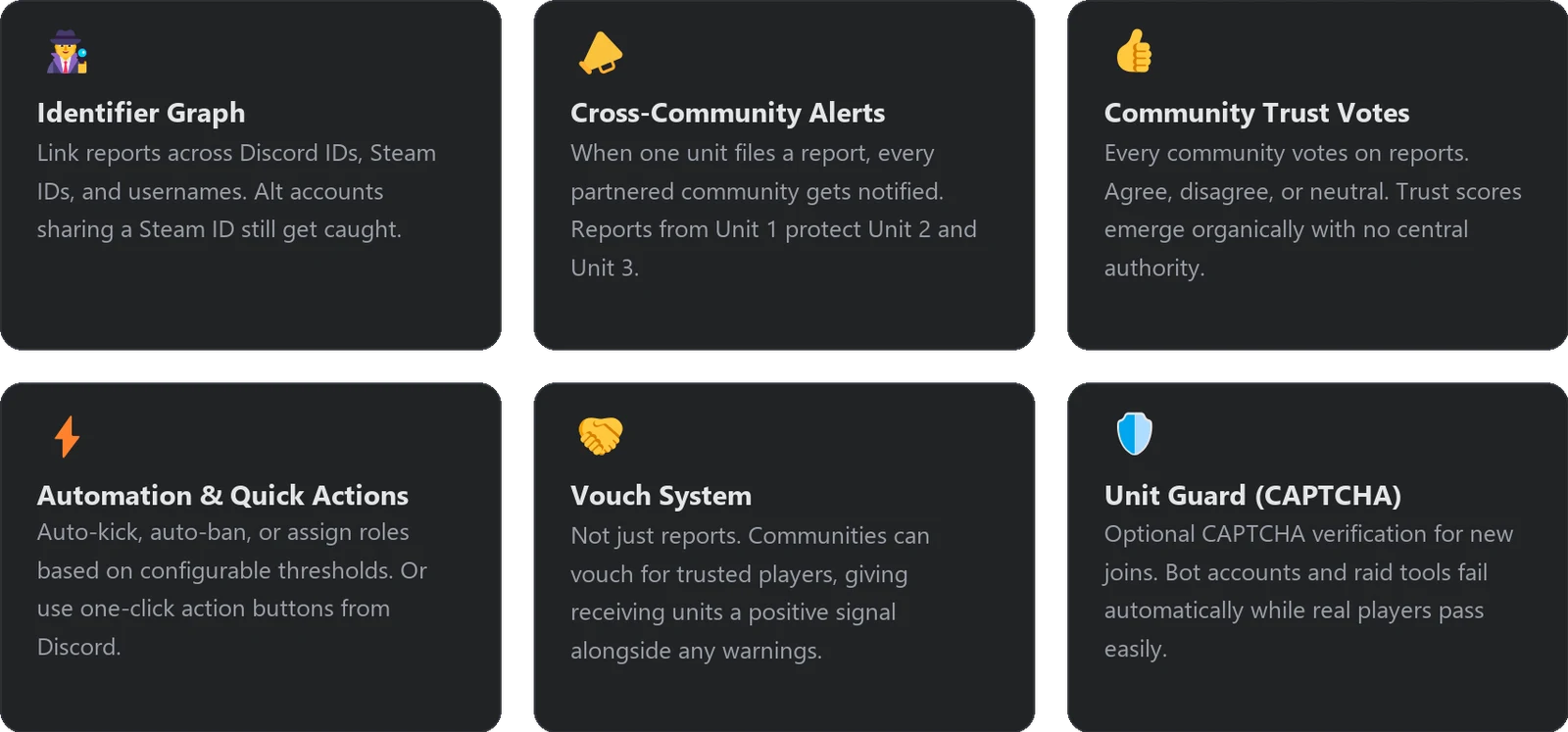
Key features: Identifier Graph, Cross-Community Alerts, Community Trust Votes, Automation and Quick Actions, Vouch System, Unit Guard (CAPTCHA).
Built for how MilSim units actually operate
UnitShield is not a generic moderation bot. It is built specifically for the problems MilSim communities face: mod leaking, member poaching, stolen valor claims, and the serial time-wasters who join units, consume training resources, and vanish.
The report categories, the cross-community model, the identifier graph that catches alt accounts, and the trust voting system all exist because these are the problems MilSim unit leaders told us they deal with every week.
There is no single moderator with veto power. Every community controls its own reports, its own votes, and its own automation thresholds. The platform just makes sure the information travels.
UnitShield is a tool to help you make better decisions, not to make those decisions for you. Use it as part of your process, give people a fair chance, and let the evidence speak for itself.
Start protecting your unit
All core features are free. Sign in with Discord to get started.
Comments (1)
Sign in to join the discussion.
Addresses a real pain point for unit leaders. Serial problem players moving between communities with no shared history has been an issue for years. The combination of cross-community alerts, evidence-focused reports, community voting, and appeals seems like a thoughtful approach. Looking forward to seeing how adoption goes.